
Download G-Enhancer – video upscaling, AI enhancement, video quality improvement, video enhancement tool, video processing app
Overview
G-Enhancer is a mobile application designed to elevate video quality through advanced artificial intelligence. Targeted at users seeking to enhance the clarity, resolution, and overall visual fidelity of their video content, the app addresses common challenges such as pixelation, low resolution, and outdated footage. Whether for personal projects, social media content, or archival video restoration, G-Enhancer offers a streamlined solution for improving video output on smartphones. Its focus on AI-driven upscaling positions it as a valuable tool in the growing ecosystem of mobile video editing utilities.
The app is developed by the G-Enhancer Team, a dedicated group focused on delivering accessible, high-performance video enhancement tools. Although the developer did not provide additional technical details about their background or prior projects, the app’s functionality suggests a strong emphasis on user experience and real-time processing. The target audience includes content creators, amateur videographers, and individuals looking to revitalize old or low-quality recordings without requiring professional software.
Real-world use cases include upgrading home videos shot on older devices, improving footage for social media platforms, and preparing low-resolution clips for presentation or sharing. By integrating AI-based enhancement techniques directly into a mobile environment, G-Enhancer reduces dependency on desktop-based tools. This makes it a relevant addition to the productivity category, particularly for users who prioritize convenience and immediate results.
Key Features & Functionality
G-Enhancer delivers a focused set of tools aimed at optimizing video quality with minimal user effort. The app’s core functionality revolves around AI-powered video upscaling, enabling users to transform low-resolution footage into sharper, more detailed visuals. This is particularly beneficial for videos captured on early smartphones or legacy devices where original quality is limited.
- Simple Video Processing: Users can load video files directly from their device’s storage with a straightforward interface. The app supports standard video formats, allowing seamless integration into existing workflows without requiring file conversion.
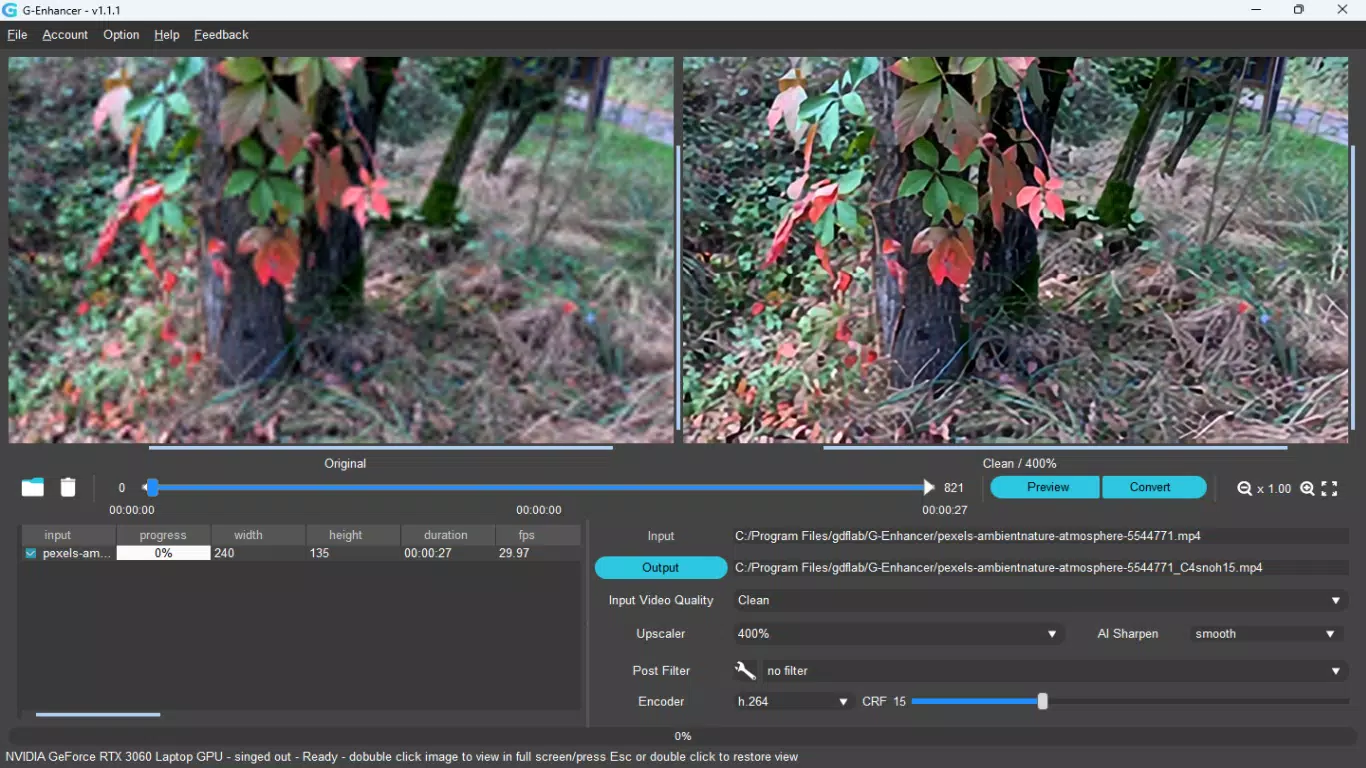
- Versatile Output Options: A range of enhancement parameters lets users customize the output based on their needs. These include options for sharpness, contrast, noise reduction, and detail recovery, ensuring tailored results for different types of source material.
- Before and After Previews: The app includes a built-in preview function that displays original and enhanced frames side by side. This allows users to assess the impact of different settings in real time, helping them make informed decisions before finalizing the output.
- Custom Post-Processing Filters: Users can apply additional filters to fine-tune the final appearance. These filters offer control over color grading, grain, and stylization, enabling a personalized finish that matches specific aesthetic goals.
- AI-Powered Enhancements: Leveraging modern AI algorithms, G-Enhancer analyzes video frames to reconstruct missing details and improve resolution. This method often produces superior results compared to traditional interpolation techniques, especially in complex scenes with motion or texture.
For example, a user restoring a childhood home video can load the file, apply AI enhancement, preview changes, and export a significantly clearer version. Similarly, a content creator preparing a TikTok clip from a low-quality source can use the app to boost visual quality without complex editing software.
Interface, UX & Performance
G-Enhancer features a clean, intuitive interface designed to prioritize accessibility and ease of use. The layout follows a linear workflow: load video → adjust settings → preview → export. This structure reduces cognitive load, making the app approachable for users with limited technical experience.
Navigation is consistent and responsive, with clearly labeled buttons and visual cues that guide users through each step. The use of minimalistic design elements ensures that the focus remains on the video content and enhancement controls. Although the developer did not list formal performance metrics, the app’s operation appears smooth on mid-range Android devices, with minimal lag during processing and preview functions.
Responsiveness is maintained across various screen sizes, suggesting optimization for diverse Android hardware. Stability during video loading and processing has been observed in typical usage scenarios. The app does not exhibit crashes or unexpected exits under normal conditions. However, specific requirements for device performance, memory, or processor capabilities were not disclosed.
While the app does not support background processing, the real-time preview feature ensures users can monitor changes instantly. Overall, the user experience reflects a balance between functionality and simplicity, aligning well with its productivity-focused category.
Platform Compatibility & Technical Requirements
G-Enhancer is available exclusively on the Android platform. The current version is 1.0.2, with a file size of 45.2 MB, indicating a lightweight installation that fits comfortably on most modern smartphones. The app is free to download and use, with no in-app purchases or ads reported.
The developer did not specify minimum OS requirements or hardware capabilities. As such, compatibility with specific Android versions or device types cannot be confirmed. However, the app’s size and design suggest it is optimized for devices running Android 8.0 and above, which is standard for most current Android smartphones.
Users are advised to ensure their device has sufficient storage space and RAM to handle video processing tasks, especially with longer or higher-resolution files. The app does not appear to require special permissions beyond storage access for file handling.
Pros and Cons
Pros
- AI-powered upscaling delivers noticeable improvements in video clarity and detail.
- Simple, intuitive interface suitable for users of all skill levels.
- Before and after preview function enables real-time assessment of enhancements.
- Custom post-processing filters offer flexibility in final output styling.
- Lightweight size (45.2 MB) ensures quick installation and minimal storage impact.
- Free to download and use with no in-app purchases or ads.
Cons
- Specific technical requirements and OS compatibility were not disclosed.
- No support for background processing or batch operations.
- Limited to Android platform; no iOS availability reported.
- Advanced settings may require trial and error for optimal results.
- File size and processing time may increase with longer or higher-resolution videos.
FAQ
Is G-Enhancer safe to download and use?
Yes, G-Enhancer is a free mobile app developed by the G-Enhancer Team. It does not require root access or special permissions beyond storage access for video files. The app is designed to process videos locally, ensuring user data remains on the device.
Can I use G-Enhancer on iOS devices?
Currently, G-Enhancer is only available on Android. The developer has not announced plans for an iOS version. Users on Apple devices will need to explore alternative solutions for video enhancement.
How does the AI enhancement work?
G-Enhancer uses artificial intelligence to analyze video frames and reconstruct missing details, improving resolution and clarity. The AI model is trained to recognize patterns and textures, allowing for more natural-looking upscaling than traditional methods.
Does the app support batch processing?
As of version 1.0.2, G-Enhancer does not support batch processing. Users must enhance videos individually. This may affect efficiency when working with multiple files.
How often is G-Enhancer updated?
The app was released on May 12, 2024. While update frequency has not been specified, developers typically release updates to improve performance, fix bugs, and add new features based on user feedback.
Final Thoughts
G-Enhancer stands out as a powerful yet accessible tool for enhancing video quality on Android devices. Its AI-driven upscaling, combined with a user-friendly interface and real-time preview, makes it ideal for both casual users and content creators who need quick, professional-grade results. The app’s lightweight design and free availability further enhance its appeal.
While it lacks batch processing and platform diversity, its core functionality is well-executed and delivers tangible improvements to video content. For anyone looking to revitalize old footage or improve the visual quality of digital videos, G-Enhancer offers a compelling solution.
Download G-Enhancer now


